
Introduction
Context
AWS Transform for mainframe SDE (Standard Delivery Environment) aims to simplify and speed up mainframe modernization projects on AWS. By offering a pre-configured environment with the AWS Transform for mainframe refactor Toolbox, SDE reduces the setup time and complexity faced by customers, particularly those with strict security policies.
AWS Transform for mainframe modernization projects primarily rely on a test case approach based on customer inputs to validate the functional equivalence of the modernized Java code. The number of test cases in a project can range from a few hundreds to several thousands, depending on the project's size. Furthermore, these test cases are integrated in a Regression testing suite which is replayed on a regular basis for the duration of the project. Regardless of the project size, the processing of test cases plays a crucial role, and is a significant part of the effort, which can become burdensome due to repetitive data processing.
A test case includes a database dump taken before executing the test, followed by another dump immediately after. These are called the initial and expected data. The purpose of this is to compare the results after migrating the program with the expected data. Different workflows can be adopted on the development side, depending on the roles of software developer. One team could be tasked with data migration preparation, while another team focuses on transforming the entire scope and establishing test cases within a CI/CD/CT (Continuous Integration, Continuous Deployment, Continuous Testing) system. Additionally, there might be a team responsible for debugging any issues identified in the CT's test cases. In each of these distinct roles, the restoration of databases plays a crucial role. These database restorations can be time-consuming, taking several hours for large projects, and may often require the software engineer to switch to other tasks while awaiting results.
To solve this lack of efficiency, AWS Transform for mainframe service delivery team developed a complete environment intended for project modernization. This environment was initially developed to accelerate the delivery pace of a large project. The primary objective was to streamline functional equivalence testing, and allow team members to dive deep into the project's complexity. As a result, with SDE implementation, database restoration process time was reduced from a total of over 10 hours to less than a minute, resulting in time reduction by 99%. SDE platform aims to optimize data and code utilization during modernization projects. It accomplishes this through automation, by leveraging AWS cloud services such as EBS (Elastic Block Storage) snapshots, EC2, ECS and RDS in conjunction with AWS Metadata. It is specifically designed for flexible configuration, enabling the creation of on-demand application servers with databases for various types of development and testing environments.
General workflow
Below is the main workflow that qualifies a deliverable. The idea is that all tests must be completed and marked as “green” for any given milestone to proceed with the delivery.
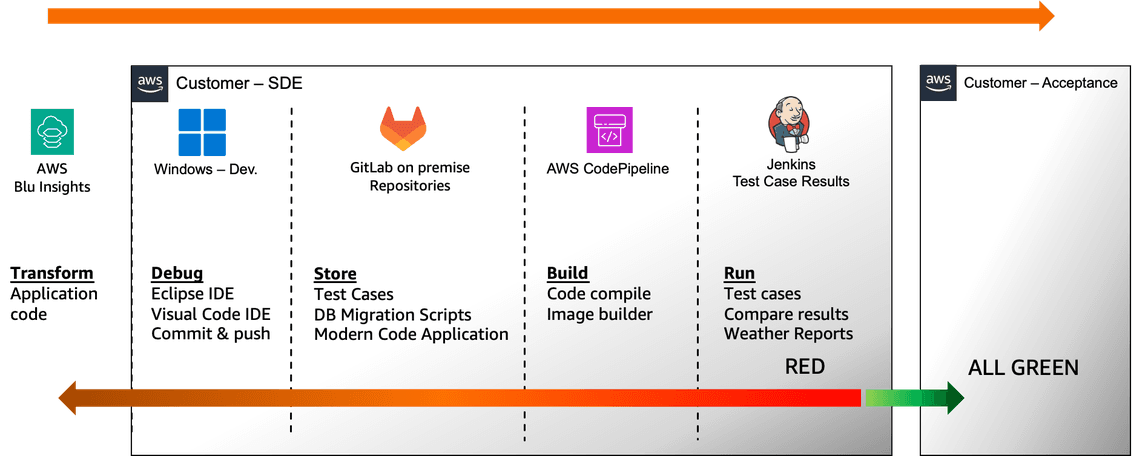
Components used by SDE in customer account:
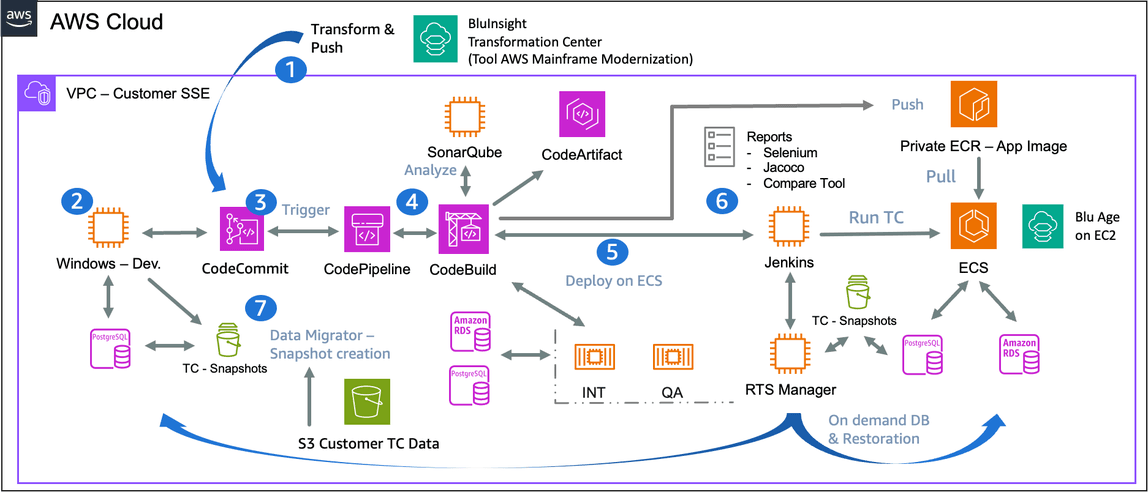
| 1 | - | Existing code is transformed and then pushed to CodeCommit (using AWS Transform for mainframe refactor Git Booster or downloading directly an archive). |
| 2 | - | Code is recommitted to another Git repository (which is the project repository). |
| 3 | - | Two branches exist on CodeCommit: develop and main (corresponding to environments INT and QA). |
| 4 | - | Modern application code is built |
| 5 | - | The built application is packaged as a Docker image, pushed to ECR, and deployed as a task to ECS (INT: develop, QA: main). |
| 6 | - | Jenkins runs nightly test cases or on-demand; all test case environments are set up for the duration of the test cases. |
| 6.1 | Launch a task on ECS (pull the image from ECR) | |
| 6.2 | Create a database with corresponding snapshots using RTS Manager - Regression Testing Snapshots (either RDS or a database on EC2) | |
| 6.3 | Execute either an endpoint or Playwright scripts. | |
| 6.4 | Run Jacoco. | |
| 6.5 | Run the database AWS Transform for mainframe Compare Tool. | |
| 7 | - | Snapshot creation is done using customer data from an S3 bucket. |
| 7.1 | AWS Transform for mainframe Data Migrator is run to migrate data. | |
| 7.2 | A snapshot is created by the application RTS. It creates either EBS snapshots or RDS snapshots (team choice). Note, these snapshots will be reused either by CI or SDE during test case execution. |
INT & QA are hosted on ECS, their databases are managed by RTS (Regression Testing Snapshots). Also note: these environments are stables and are re-deployed for every commit on branches develop & main.
Components architectures
This architecture is divided in three components listed below. Each component is distributed as a CDK bundle (.zip), and must be installed in the listed ordered shown below. Furthermore, those CDKs are installed by customer on the own AWS account.
SDE DevOps Setup
Base infrastructure for SDE (VPC, Firewall, Subnets, S3, etc).
Please see: SDE DevOps Setup Architecture
SDE DevOps Pipelines
Tool tailored for delivery teams, aimed at ensuring high-quality deliverables and achieving functional equivalence in modernization projects. This is done by providing an additional development environment layer to existing infrastructure (CodeCommit, CodeArtifact, CodeBuild, ECS, Jenkins, etc.)
Please see: SDE DevOps Pipelines Architecture
SDE Regression Testing Snapshots
RTS comes with a Web application and an API to manage databases creation and restoration. This application enables users or CI/CD to instantly create databases from snapshots and also RTS provides management capabilities for multiple database engines.
Please see: SDE RTS Architecture
Artifacts Distribution
Access to SDE Artifacts
SDE is intended to be deployed and used on customers’ AWS accounts.
SDE distributes CDK code in Zip format from AWS Transform for mainframe refactor Toolbox.
The delivered code can be configured, revised, and modified if necessary by the customer.
Many basic settings are proposed during SDE deployment:
- AMI deployed
- EC2 instance type
- Custom KMS key
- Creation of predefined IAM Roles for developers and Project Managers
- Automation of EC2 instance updates
- EC2 Lifecycle