
Architecture
Overview
SDE DevOps Setup is the base infrastructure for the AWS Transform for mainframe Standard Delivery Environment (SDE). It supports the deployment of AWS Transform for mainframe SDE features, including SDE DevOps Pipelines and SDE Regression Testing Snapshots (RTS). This setup provisions a secure infrastructure and enables the deployment of pre-configured development EC2 instances, providing Software Developer Engineers access to all necessary tools and resources for modernization projects.
The POC/Project is conducted on an AWS dedicated account owned by the customer with access permissions for the AWS Transform for mainframe Delivery team managed by the customer.
This document provides an overview of the architecture that is deployed on a dedicated POC/Project customer AWS account. The Account is managed by the customer. This configuration is deployed using CDK Scripts.
Architecture and Tools
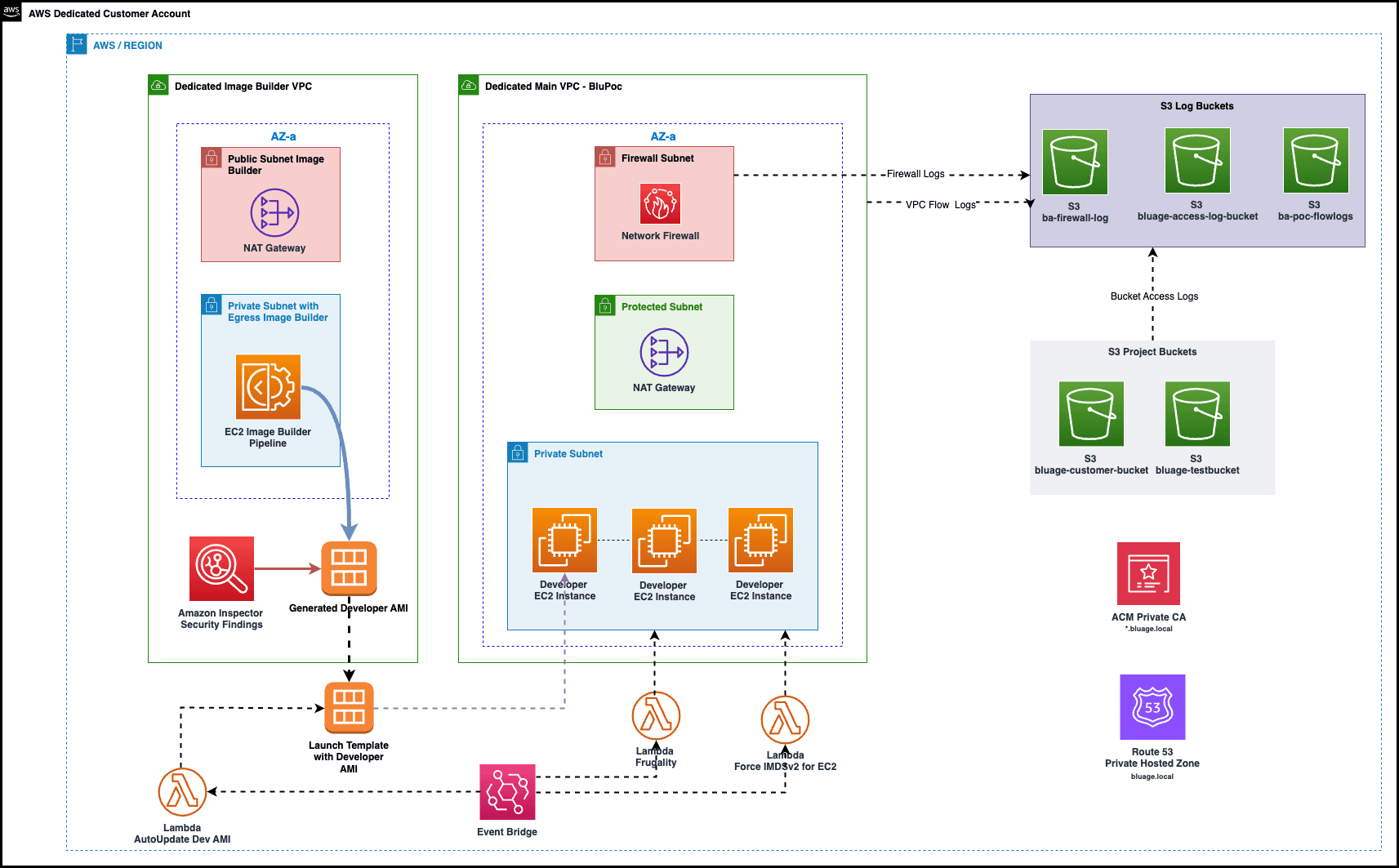
AWS Components involved
Amazon VPC Resources
VPC Public Subnet Private Subnet Isolated Subnet Internet Gateway NAT Gateway Network Firewall Route Tables Network ACLs Security Groups
VPC Endpoints
SSM EC2_MESSAGES EC2 SSM_MESSAGES KMS CLOUDWATCH CLOUDWATCH_LOGS CLOUDWATCH_EVENTS CODEDEPLOY CODEDEPLOY_COMMANDS_SECURE CODEBUILD CODEPIPELINE ECR ECR_DOCKER ECS ECS_AGENT ECS_TELEMETRY CODEARTIFACT_API CODEARTIFACT_REPOSITORIES SQS AUTOSCALING LAMBDA SECRETS_MANAGER
AWS Private Certificate Authority (ACM)
Private Certificate Authority Certificate
Logging
VPC Flow Logs Firewall Logging S3 Access Logging
CloudWatch
Cloudwatch Log Groups Amazon EventBridge Rule Cloudwatch Alarms
EC2
Launch Template
IAM
IAM Roles (optional) IAM Policies IAM EC2 Instance Profile
- Lambda Function
- EC2 Image Builder
- Cloud Formation Stacks
Network Architecture
The infrastructure is composed by a VPC over 2 availability zones. Each availability zone will host a protected subnet, firewall subnet and a private subnet
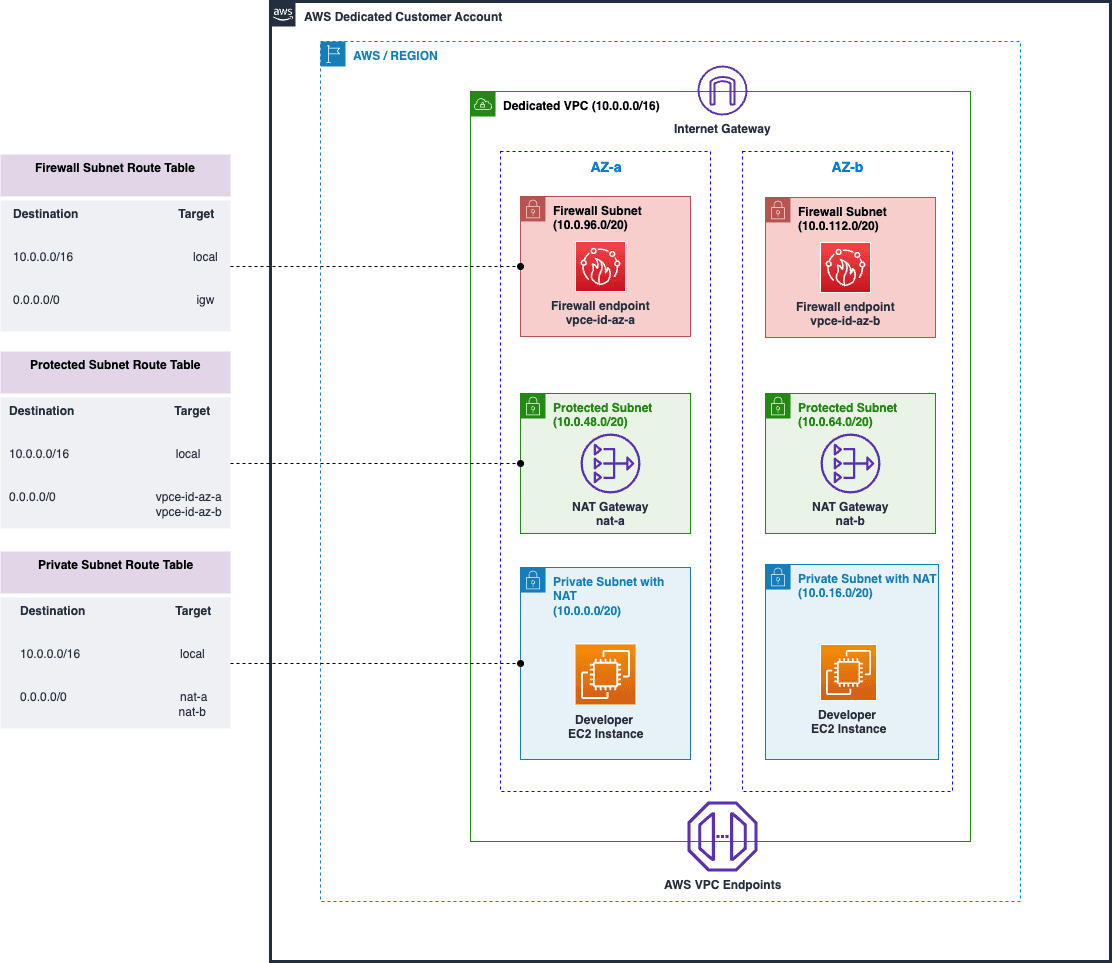
Protected subnet
This subnet is protected by AWS Network Firewall on all public components. This subnet is needed to host the NAT Gateway to enable the component located in the private network to access the internet to:
- Access to AWS Transform for mainframe refactor to run analysis and transform the code
- Access to the support ticketing system (JIRA) for AWS Delivery Teams Only
- Access the Maven dependencies and other artifacts needed for the project (Spring, Apache, etc.).
- Access Windows Update repositories to update Development Windows EC2
Others access will not be authorized. The access will be granted using AWS Network Firewall, Network ACL and security groups at the VPC level.
Firewall subnet
This subnet is needed to host AWS Managed Network Firewall to only enable needed network egress rules. By default everything will be denied. No Ingress trafic allowed; Egress will be the 4 services detailed above
Private subnet
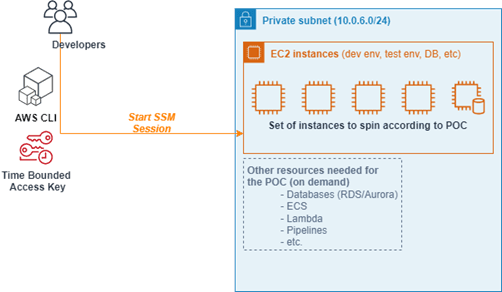
Private subnet is totally isolated from the outside. All the ports are closed by default (even 22 or 3389) using security groups. The only way to connect to an EC2 instance located in the private subnet is
- by using AWS Session Manager (SSM) from a computer having AWS CLI configured with an access key allocated to a specific granted to this account. User will be able to connect through SSM on port 3389 (Windows RDP)
- Developers must use a personalized SSM document which only authorizes Port-Forwarding connections in RDP on port 3389 and only on EC2 instances with a specific Tag : Role/Bluage
- by first connecting to an instance located on the private network using the procedure above (SSM), and then “jump” to another instance on the private network using RDP or SSH if allowed.
S3 Buckets
S3 buckets Description
| Bucket Name | Description |
|---|---|
| bluage-customer-bucket-${account}-${region} | Customer legacy code, test cases, and modern application Java code is stored here. |
| bluage-testbucket-${account}-${region} | Test bucket. User can upload test cases to this bucket, and it will be used by test server to perform CI / CD tests. |
| bluage-access-log-bucket-${account}-${region} | Access log bucket. This bucket saves the access logs of other s3 buckets. |
| ba-poc-flowlogs-${account}-${region} | VPC Flow Log Bucket |
| ba-firewall-log-${account}-${region} | AWS Firewall log bucket. This bucket save logs of Firewall activity |
S3 buckets Configuration:
All data in s3 buckets are encrypted with Server-side encryption with Amazon S3 managed keys (SSE-S3). Data transfer in and out are through secure transfer (defined in bucket policy). S3 bucket accesses are stored in access log bucket, and object versioning is enabled.
| Bucket Name | Block public access | allow only TLS requests | Access Logging | Versioning |
|---|---|---|---|---|
| bluage-customer-bucket-${account}-${region} | TRUE | TRUE | TRUE | TRUE |
| bluage-testbucket-${account}-${region} | TRUE | TRUE | TRUE | TRUE |
| bluage-access-log-bucket-${account}-${region} | TRUE | TRUE | N/A :Log Bucket | TRUE |
| ba-poc-flowlogs-${account}-${region} | TRUE | TRUE | TRUE | TRUE |
| ba-firewall-log-${account}-${region} | TRUE | TRUE | TRUE | TRUE |
Firewall Rule Groups
BluSupportServicesRuleGroup
Domains provided in this firewall rule group grants developers access to variety resources, which are required by application development needs. The full list of domains and reasons they are listed are explained below:
| Domain | Reason to add to rule group |
|---|---|
| registry.npmjs.org | Access node.js and its management system npm. Required by frontend application. |
| nodejs.org | |
| pypi.org | Access to Python packages. |
| files.pythonhosted.org | |
| license.ej-technologies.net | Access to JProfiler license server. Required by JProfiler license validation. |
| bluinsights.aws | Access to AWS Transform for mainframe service. |
| public.ecr.aws | Access to Amazon certified Images |
| cloudfront.net | Mandatory to pull image from public.ecr.aws |
BluWindowsUpdateRuleGroup
Domains listed in this firewall rule group is for Windows EC2 instance patching. Patching requires Windows OS accessing Microsoft domains to download update patches.
EC2 instances
Developer EC2 Instances
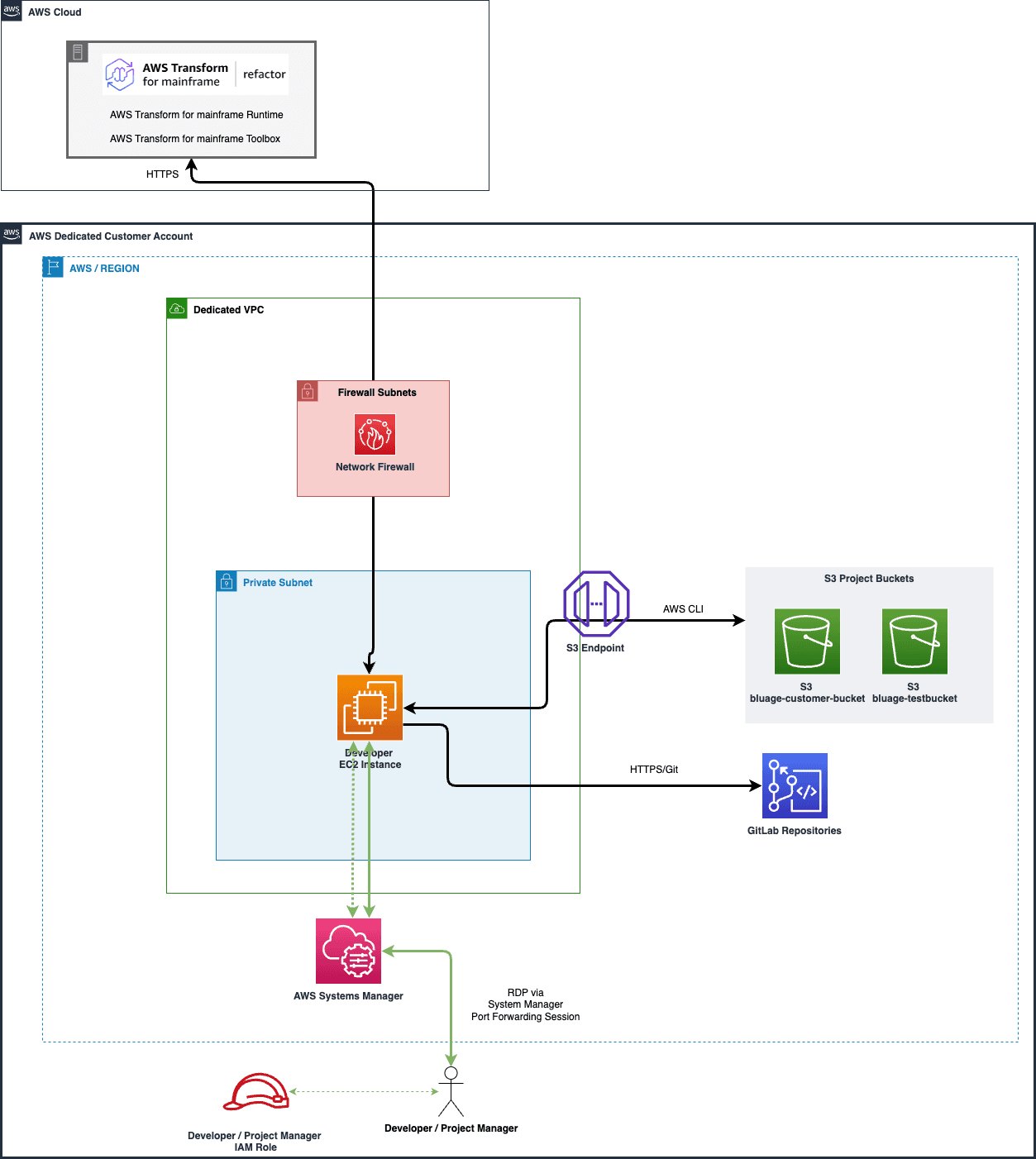
- AWS Transform for mainframe Dev environment: Windows instance with the AWS Transform for mainframe tooling. Each Developer who is assigned to the project will be created one dedicated EC2 as their workstation.
- Developer will download customer uploaded test cases and data from customer S3 bucket
- Developer will access AWS Transform for mainframe refactor
- Developer access transformed code from AWS Transform for mainframe refactor using CodeCommit Booster
- Developer will connect to the developer machine using windows remote desktop via SSM Session Manager.
- Developers must use a personalized SSM document which only authorizes Port-Forwarding connections in RDP on port 3389 and only on EC2 instances with a specific Tag : Role/Bluage
# Example:
aws ssm start-session --target instance-id \
--document-name AWSBluageEC2PortForwarding \
--parameters portNumber="3389",localPortNumber="56789"
- The following third-party tools are pre-installed in for the developer machine AMI: 7-zip, HxD, Notepad++, VSCode, NodeJS, Tomcat, Maven, DBeaver, Eclipse, Git, Chrome, Greenshot, IBM MQ, Firefox, Spring Tool Suite, SQL Developer, Web Storm, Open office, Azure Data Studio, WinSCP, WinMerge.
AWS Transform for mainframe Runtime and dependencies will be downloaded from AWS Transform for mainframe refactor Toolbox. These AWS Transform for mainframe dependencies can be updated frequently, for example every day.
Access to Dev EC2 Instances
EC2 security and controls
3 Lambda functions are deployed :
frugality-lambda
Start/Stop AWS resources in a certain category (based on labels) at a given time. For now, the Lambda is able to manage 2 kind of resources: EC2 Instances: No need to automatic restart of these EC2 instances, which is the responsibility of the developer at the start of the day. ASG clusters: Configuration of these resources must complied with the CI/CD scheduling. It's up to the devops team to manage Start/Stop of this resources
1 - The Lambda is triggered by an EventBridge Rule Scheduler
2 - The Lambda processing will iterate on all resources having the specific Tag and check for current day if the resource have to be started or stopped. This configuration action is define by the value of the parameterStore specified by the Tag
- blu_autoupdateAMI-BluAge-Developer-Instance
The Lambda function is designed to update the AWS EC2 Launch Template with the latest AMI ID that matches "AWS-Transform-SDE-Developer-ami*" pattern. It also updates an AWS Systems Manager Parameter Store parameter to store the latest AMI ID.
- Retrieves environment variables for the AMI name pattern, Parameter Store parameter name, and Launch Template name.
- Initializes AWS SDK clients for EC2 and Systems Manager (SSM).
- Checks if the specified Launch Template exists, and returns an error if it doesn't.
- Finds the latest AMI ID that matches the specified name pattern.
- Retrieves the current AMI ID from the Parameter Store parameter. If the parameter doesn't exist, it creates it with the latest AMI ID.
- Compares the latest AMI ID with the current AMI ID in the Parameter Store.
- If the AMI IDs are different, it performs the following steps:
- Creates a new version of the Launch Template with the latest AMI ID.
- Sets the new version as the default for the Launch Template.
- Updates the Parameter Store parameter with the latest AMI ID.
- Removes old Launch Template versions, keeping only the latest specified number of versions (e.g., the latest 5 versions).
- If the AMI IDs are the same, it prints a message indicating that no update is needed.
- The function returns a success message with the appropriate details.
- If any exception occurs during the execution, it catches the exception, prints the error message, and returns an error message.
SSM Parameter Store Store the latest AMI ID available.
EventBridge rule An EventBridge rule execute the Lambda function with a cron schedule.
Blu_Check_and_Modify_IMDS
This Lambda function is designed to ensure all EC2 instance started on the environment use IMDSv2. An EventBridge rule detect each startup of an EC2 instance. The lambda function is then executed. It checks the IMDS version used by the EC2 instance. If the EC2 instance used IMDSv1, the lambda function modifies the version to use IMDSv2
EC2 Instance patching through SSM
Windows and Linux EC2 instances are patched through AWS Systems Manager Patch Manager. By default, SSM Patch Manager runs everyday at midnight. The schedule can be modified by the customer.
Logging :
- Network Firewall Logging on dedicated S3 Bucket
- S3 Access Log Enabled to log on a dedicated S3 Bucket
VPC Flow Log Enabled to log on a dedicated S3 Bucket
System actors and IAM Roles
Use cases
| Actor / Roles | Use case | Description | Components Involves |
|---|---|---|---|
| Project Managers | Manage developer and ProServe access to the customer accounts | Add and remove AWS Transform for mainframe developers and ProServe consultants who work on the project | PLZ Customer Account |
| Access to AWS Transform for mainframe refactor to setup project management. | Project manager will login to AWS Transform for mainframe refactor to setup project and access for developers and ProServe. | AWS Transform for mainframe refactor Service | |
| Access to test server (Jenkins) to setup access for developers and ProServe. | Project manager can login to the test server in POC environment and setup access for project developers and ProServe people. | Test Server | |
| AWS Developers and AWS ProServe | From AWS console, developers can create and access AWS Transform for mainframe developer instances. | Each developer will have one AWS Transform for mainframe developer instance as workstation. Each developer will use their own credential to access their instance. | Customer Account, EC2 Template, Developer Instance, AMI, IAM Policy |
| From their developer instances, developers can download customer code from S3 bucket and work on the AWS Transform for mainframe tools. | Download customer data can only be allowed within the POC VPC. Access to the bucket need to be logged. | Developer Instance, Customer S3 Bucket, IAM Policy | |
| Developers can upload sanitized test data and test cases into a test S3 bucket, prepare for test server running tests. | Upload and download customer test data and test cases can only be allowed within the VPC. Access to the bucket need to be logged. | Test S3 bucket, IAM policy | |
| Developers can login to the test server and run and setup Jenkins CI/CD pipeline. | Developer will use assigned Jenkins login to setup pipeline and run tasks. | Test Server | |
| From their developer instances, developers can commit and check-in code into CodeCommit repository. | Check-in and Check-out customer data can only be allowed within the VPC. | VPC, CodeCommit, IAM Policy | |
| From their developer instances, developers can access AWS Transform for mainframe managed repository, tools and Jira | Developer need to download daily released AWS Transform for mainframe dependencies and tools for customer project. | Developer instances and Network Firewall | |
| From their developer instanced. developers can upload tested transformed code and packages into customer S3 bucket. | Developer can only upload /download released code in designated prefix which is not the same as customer upload/download prefix. | Developer instance, Customer 3 Bucket |
IAM Roles
The creation of the IAM roles below is optional. When deploying the CDK, the customer can choose to create these roles or subsequently make available roles that they have created en defined themselves.
Project Manager Role
Project Manager (role name: BluAge_Project_Manager_IAM_Role) in charge of the project that developed on POC Landing Zone customer account. This role has access to most of the resources, such as EC2, S3, RDS, etc., but not to organizational services. Additionally, Project Manager role could not create / update / delete IAM policies. Access to S3 are limited to be within the VPC.
Developer Role
Developer (role name: BluAge_Developer_IAM_Role) is the user of the POC Landing Zone customer account. This role has limited access to multiple resources. For instance, Developer role cannot create new EC2 instances, but they can run the instances and use their assigned instances for development. Examples of partially allowed resources are: EC2, S3, CodeCommit, CodePipeline, CodeBuild, CodeDeploy, RDS, SSM, KMS, IAM and CloudWatch. The permission given to Developer role is mainly on using the resources, but not on changing the resource configurations. All the data that developers can access are limited to be within the VPC.