
Terminal emulation
AWS Transform for mainframe refactor Terminals provides an access to character-based hosts. It can connect to mainframes or AS400 environments via TN3270 or TN5250 terminals.
Terminals application is available in Blu Age Toolbox, you can download it through the tool panel.
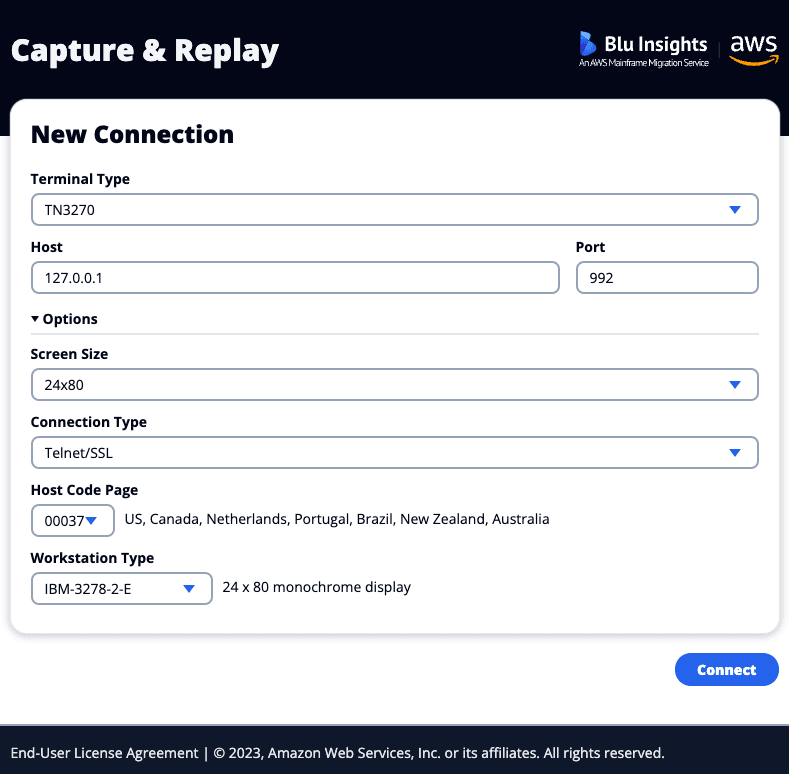
AWS Transform for mainframe refactor Terminals is not intrusive and connects to the host through a standard socket connection, without specific installation expected on the mainframe, or AS400.
The connection type is customizable. It can be a simple Telnet connection, Telnet/SSL or TLS v1.2. For this last option, the user needs to provide a certificate with its private key or a keystore with its password. The server may use them for client authentication.
There are three additional options for the terminals:
- The character encoding of the host.
- The workstation type.
- [TN5250 Only] The Workstation ID, also called Device Name or LU Number. It represents a dedicated LU name or number on the AS/400 5250 server that you want your 5250 sessions to connect through. If in doubt, leave this field blank. This field can only be used by a single session at a time.
Besides traditional terminal emulator features (display, cursor management, writing), AWS Transform for mainframe refactor refactor terminals manage the following features:
- TAB and SHIFT+TAB keys allowing to go to the next or previous field.
- Copy and Paste.
- HOME button that places the cursor in the first field of the page.
- END button that places the cursor at the position following the last character of the current field. If the field is full, it places the cursor at the last character.
- SHIFT+END buttons that delete the text written in the field, starting from the cursor.
- INSERT key allowing you to start or end Insert mode.
- pageUp and pageDown to browse paginated screens.
- Function keys (F1 to F24) mapping.
- [TN5250 only] Quick Field Exit (+ on the numeric pad) and Quick Field Minus (– on the numeric pad) keys.